Final Reflection from Presentations – Mindmeister
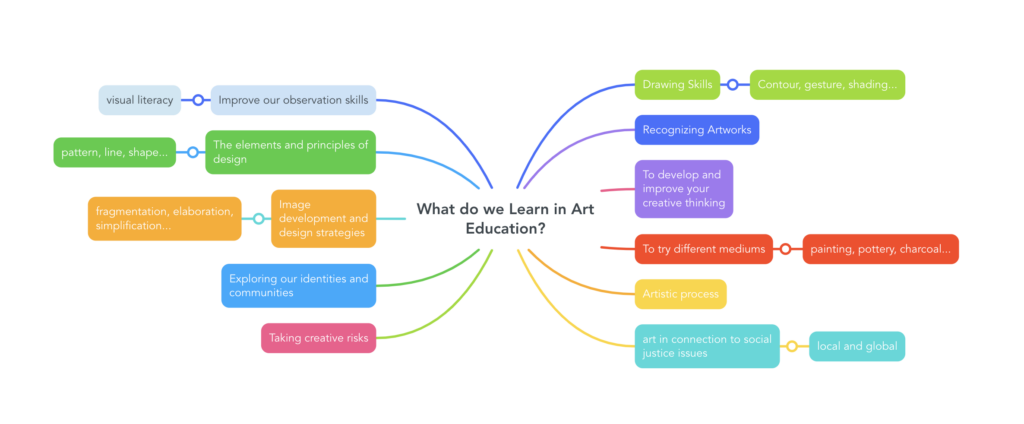
I want to focus on mindmeister, as I see myself using this technology the most out of any we were presented this week. I love brainstorming and mind-mapping for myself, and I found this site offered a streamlined and simple but effective tool I could use with students. The obvious disadvantage would be the fact there is a paid version, but as I have uploaded, I just took a screenshot of what I made. It would be a bit frustrating starting from scratch or losing a copy over time, but I think for simple lessons or getting ideas down as a group this would work just fine. I would love to know how other artists use this or plan on using the tool, as my art education map was only the first idea that came to mind. I think a benefit would be it is more permanent than just writing out ideas on the board, I could screenshot this and upload to google classroom for example. While I have come to understand this term that no one person is a visual/kinaesthetic/auditory learner, but that we all need all different types of instruction to succeed, I think I do prefer a visual, especially a slightly colourful one, and I like that it is interactive without becoming a distraction.
Here is my mind map, and the inspiration I found on pinterest from Julia Stubbs . I think the mindmeister example is much more engaging, and you can organize new ideas into it if need be. I think in creating something like this, students can see more clearly the outcomes and goals as something more interconnected than just a list from the curriculum website. I also want students to have the opportunity to tell me what they want to learn, as that is valuable information that will help me when building unit plans and what we cover during the term. Art can have a lot of choice, as long as there is direction!